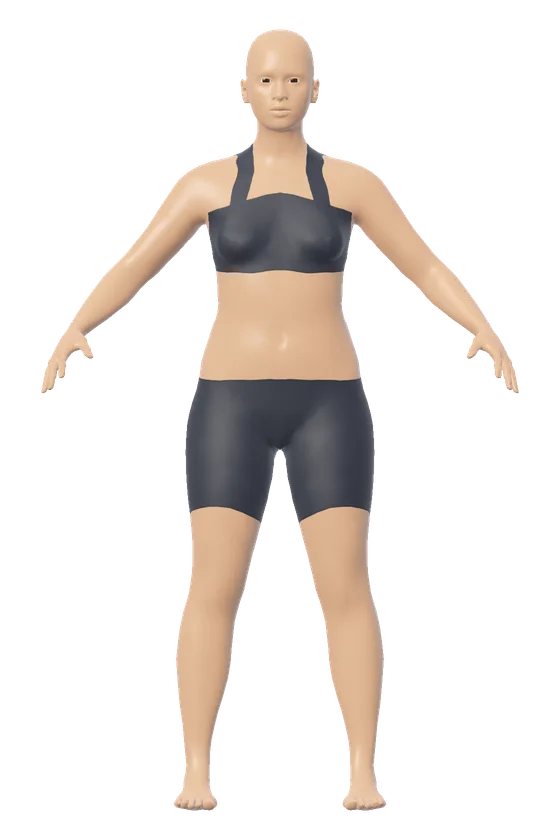
The 3D body visualizer opens on a female figure of 165 cm and 62 kg, or a male figure of 178 cm and 78 kg. Each number you change reshapes it. Height scales the whole figure. Weight sets how much volume the figure holds. A tape measurement you type is held exactly, and the rest of the body adjusts around it. Height and weight are the only numbers it needs, so it also works as a plain height and weight simulator.
A worked example: 165 cm, 62 kg, then a 70 cm waist
Start with the female figure at 165 cm (5 ft 5 in) and 62 kg (137 lb), with no tape measurements typed in. The model estimates a bust of 89.6 cm, a waist of 76.6 cm and hips of 100.2 cm. The results read BMI 22.8, healthy weight. Waist to hip is 0.76, under the 0.85 cut-off for women. Waist to height is 0.46, which is healthy central adiposity. The shape by these numbers is a bottom hourglass, and a BMI of 18.5 to 24.9 at this height is 50.4 kg to 67.8 kg.
Now type 70 into the waist box. The weight is still 62 kg, so the volume that left the waist has to sit somewhere else. The bust rises to 91 cm, the hips to 102.1 cm and the thigh from 51.7 to 52.8 cm. Waist to hip falls to 0.69 and waist to height to 0.42. The shape class stays bottom hourglass: the hips are now 4.3 inches larger than the bust and 12.6 inches larger than the waist. The waist row now says "set by you". Every other row still says "estimated", and the Auto button beside the waist hands it back to the model.
How height, weight and tape numbers become a figure
The figure is a 3D mesh of an adult body with about 13,500 points. The mesh and its shape controls come from the MakeHuman project's open assets, which are released under CC0. The code that measures, fits and draws the figure is the site's own.
Weight takes the most arithmetic. The tool works out the figure's volume in liters and multiplies it by a body density to get the weight the figure stands for. Then it adjusts the figure until that weight equals the weight entered.
The density comes from two published formulas. The first, by Deurenberg, Weststrate and Seidell (1991), estimates body fat percent from BMI, age and sex. The tool holds age at 30. The second treats the body as two parts: fat at 0.900 kg per liter and everything else at 1.100 kg per liter. Those two densities give the conversion printed in the US Navy's body fat reports, which credit it to Siri (1961). Percent fat is 495 divided by density, minus 450.
Take 62 kg at 165 cm. The BMI is 22.8 and the formula gives 28.8 percent fat for a woman of 30. That mix has a density of 1.034 kg per liter, so the figure is sized to hold 62 divided by 1.034, which is 60 liters. Typical densities are 1.03 to 1.05 kg per liter at a healthy BMI and near 0.98 at a very high BMI.
Tape measurements are taken on the mesh the way a tape works. The tool cuts the mesh with a flat plane at the right level and measures the tight path around the cut. Trunk measurements leave the arms out.
| Measurement | Where the tool takes it on the figure |
|---|---|
| Bust or chest | Level with the fullest point of the chest |
| Waist | At the natural waist |
| Hips | At the rearmost point of the buttocks |
| Neck | Across the middle of the neck |
| Arm and leg girths | Around the limb, square to it |
| Shoulder width | Straight line between the two outer shoulder points |
| Inseam | Height of the crotch from the floor |
To take the same measurements on yourself, the guide on how to take body measurements at home gives each tape position.
When a measurement is typed in, the tool solves for the body that has that measurement and still has the height and weight entered. If the numbers cannot all be true of one model body, the measurements win and the tool says what that body would weigh. A bust of 91.4 cm, a waist of 61 cm and hips of 91.4 cm at 165 cm and 62 kg is one such case. The tool reports a model body of about 60.1 kg. How common those three numbers are is covered in the guide to 36-24-36 measurements.
The Build slider runs from softer through typical to athletic. It changes how much of the weight the model carries as muscle. At 165 cm and 62 kg, the athletic end gives the female figure a 65.6 cm waist and the softer end a 77.7 cm waist. Build is a setting of the model and does not stand for any measurement you can take.
One height at five weights
The Weight range view puts five figures in a row at one height. The weight you entered stands in the middle, with two steps lighter and two steps heavier. With the female figure at 165 cm, 62 kg and a 5 kg step, the row runs from 52 kg to 72 kg. Each step of 5 kg adds about 5 cm to the waist the model estimates.
| Weight | BMI | CDC category | Bust, waist, hips the model estimates |
|---|---|---|---|
| 52 kg (115 lb) | 19.1 | Healthy weight | 84.1, 66.5, 91.0 cm |
| 57 kg (126 lb) | 20.9 | Healthy weight | 86.3, 71.4, 95.6 cm |
| 62 kg (137 lb) | 22.8 | Healthy weight | 89.6, 76.6, 100.2 cm |
| 67 kg (148 lb) | 24.6 | Healthy weight | 92.8, 81.6, 104.0 cm |
| 72 kg (159 lb) | 26.4 | Overweight | 96.0, 86.8, 107.6 cm |
These are the numbers the model draws when none is typed, and your own may be larger or smaller. For the reverse view, one weight at several heights, there is the guide to what 150, 180 and 200 pounds look like.
What a model figure can show, and where it stops
The figure is an estimate from a general body model. Two people with the same numbers can look different. It is not a scan or a photo of anyone, and it does not predict how a body will look after a change in weight. The figure wears a plain fitted base layer and carries no detail beyond a general human form.
Height runs from 120 to 230 cm, which is 3 ft 11 in to about 7 ft 6.5 in. Weight runs from 30 to 250 kg (66 to 551 lb). The figure's shape runs from about BMI 13 to about BMI 50. Past either end the figure stops at its lightest or heaviest shape, and the tool says so. The numbers are still worked out from what was entered. At 165 cm and 150 kg, the BMI reads 55.1 and the figure stops at about 137.7 kg.
The numbers beside the figure are screening measures. The CDC calls BMI a screening measure and notes that it does not distinguish between fat, muscle and bone mass. Waist to hip ratio is set against the World Health Organization's cut-off points: 0.85 or more for women and 0.90 or more for men. The WHO report lists both as a substantially increased risk of metabolic complications. Waist to height ratio is sorted into the NICE bands. A ratio of 0.4 to 0.49 is healthy central adiposity, 0.5 to 0.59 increased and 0.6 or more high. NICE applies those bands to adults with a BMI under 35.
Both ratios use the figure's waist. While the waist row says "estimated", each ratio is an estimate too. Type your own waist and hips to get ratios that are yours. The waist to hip ratio calculator and the waist to height ratio calculator ask for the tape numbers directly.
The shape name follows measurement rules published for research on women's clothing sizes. They are the formulas of Lee and colleagues (2007), as printed by Sokolowski and Bettencourt (2020). They sort the differences between bust, waist, high hip and hips, in inches, into classes such as hourglass, spoon and rectangle. The high hip is read from the figure. The rules were built for clothing research and say nothing about health. They cover women's measurements only, so the male figure's numbers are not sorted into a class. To check each rule against your own numbers, use the body shape calculator.
For your own health, a doctor or nurse can assess you in person.
Compare two bodies, line up five weights, read the tape
Choose "Compare two" to set a body A and a body B. They can sit side by side, or overlaid with B drawn as a light outline over A. To line up as many as eight people by height, use the height comparison.
In "Weight range", the step between figures can be set from 1 to 20 kg, or 2 to 40 lb. Each figure carries its weight and BMI.
Press "Tape lines" to draw the chest, waist and hip tapes on the figure with their values. A ruler stands beside the figure.
Drag with a mouse or swipe with a finger to turn the figure in any direction, or use the arrow keys. Pinch, hold Ctrl and turn the mouse wheel, or press the plus and minus buttons to zoom. Two fingers, or Shift and a drag, slide the view. The round rotate control starts or stops a slow spin, and the home button returns to the front. The Front, Side and Back buttons jump to those views, and a full screen button appears where the browser allows it.
Pick a body shape from the pictures to change how the same weight is carried on the same frame. The female figure has seven: hourglass, top hourglass, pear, rectangle, inverted triangle, apple and diamond. Each sets the bust, waist and hips to numbers that fall inside that shape and keeps the weight you entered. At 165 cm and 62 kg the hourglass comes out at 96.9, 70.2 and 98.2 cm, and the rectangle at 93.0, 80.3 and 95.6 cm. The male figure has five: rectangle, trapezoid, inverted triangle, triangle and oval. Those are everyday names with no published measurement standard. The body shape visualizer puts every shape side by side at one height and weight.
Units switch between centimeters and kilograms, feet, inches and pounds, or feet, inches, stone and pounds. Switching keeps every value, and tape measurements show in centimeters or inches. Skin tone can be one of six tones or a neutral clay finish, and it changes nothing but the color.
"Save image" downloads a PNG of the current view. "Copy a link to this body" makes a link that carries the numbers inside the link itself. Everything is worked out in your browser, and the numbers you type are not sent to a server.